Iptv Guide
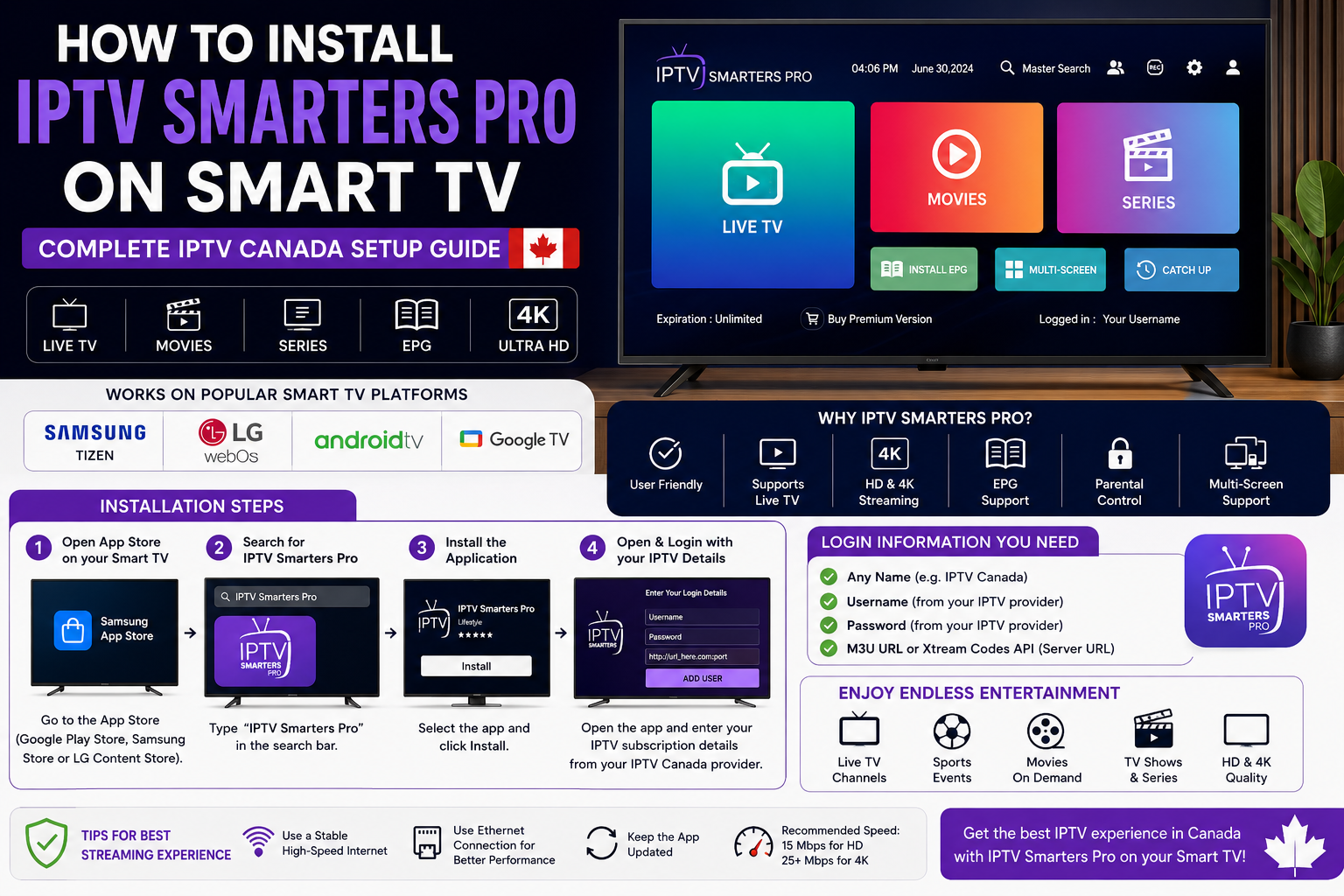
How to Install IPTV Smarters Pro on Smart TV: Complete Guide for IPTV Canada Users
As IPTV continues to grow in popularity across Canada, more people are looking for simple ways to enjoy live TV channels, movies, sports, and on-demand content directly on their Smart TVs. One of the most popular applications for accessing IPTV services is IPTV Smarters Pro. Known for its user-friendly interface and reliable performance, IPTV Smarters Pro has become a preferred choice for IPTV Canada users who want a seamless streaming experience.
If you are wondering how to install IPTV Smarters Pro on your Smart TV, this guide will walk you through the process while helping you understand the benefits of using the app for IPTV streaming.
What Is IPTV Smarters Pro?
IPTV Smarters Pro is a media player application designed to work with IPTV subscriptions. It does not provide channels or content on its own. Instead, it allows users to access content supplied by their IPTV service provider through M3U playlists, Xtream Codes API, or URL-based login credentials.
The app is widely used because it supports live television, video-on-demand content, catch-up TV, electronic program guides, parental controls, and multi-screen viewing. For many IPTV Canada subscribers, IPTV Smarters Pro offers a convenient way to organize and stream entertainment on a Smart TV.
Why IPTV Smarters Pro Is Popular Among IPTV Canada Users
The popularity of IPTV Smarters Pro comes from its simplicity and flexibility. Unlike traditional cable services, IPTV allows viewers to watch content through an internet connection. IPTV Smarters Pro makes that process easy by providing a modern interface and smooth navigation.
Some of the main advantages include:
Easy setup and installation
Support for live TV channels
High-quality HD and 4K streaming
User-friendly design
Electronic Program Guide (EPG) integration
Compatibility with multiple IPTV services
Support for movies, series, and sports content
These features make IPTV Smarters Pro one of the most recommended IPTV player apps for Canadian households.
How to Install IPTV Smarters Pro on Android TV or Google TV
If your Smart TV runs Android TV or Google TV, installation is usually straightforward.
Start by turning on your television and connecting it to the internet. Open the Google Play Store and use the search function to look for IPTV Smarters Pro. Once the application appears in the search results, select it and begin the installation process.
After installation is complete, launch the app and enter the login details provided by your IPTV Canada service provider. These credentials may include a username, password, and server URL or an M3U playlist link.
Once the information has been entered correctly, the application will load your channels, movies, and other available content.
Installing IPTV Smarters Pro on Samsung Smart TVs
Samsung Smart TVs use the Tizen operating system, which may have different application availability depending on the region and software version.
To install IPTV Smarters Pro, open the Samsung App Store and search for the application. If available, download and install it directly on your television.
After installation, open the app and enter the IPTV subscription details supplied by your IPTV Canada provider. The system will then synchronize your content and display the available categories.
If the application is not available in your region, some users choose alternative IPTV-compatible apps or external streaming devices that support IPTV Smarters Pro.
Installing IPTV Smarters Pro on LG Smart TVs
LG televisions use the webOS operating system. The installation process is similar to Samsung devices.
Open the LG Content Store and search for IPTV Smarters Pro. Download and install the application if it is available for your television model.
After opening the app, enter your IPTV login credentials and allow the application to import your channels and playlists. Within a few moments, you should have access to your IPTV content.
Many IPTV Canada subscribers prefer LG Smart TVs because of their excellent picture quality and smooth app performance.
Setting Up IPTV Smarters Pro After Installation
Installing the application is only the first step. Proper setup ensures the best IPTV viewing experience.
When launching IPTV Smarters Pro for the first time, you will typically see several login options. Most IPTV Canada providers use Xtream Codes API because it is easy to configure and provides quick access to content.
You may need the following information:
Username
Password
Server URL
IPTV subscription details
Once entered correctly, the application will automatically load available channels, TV guides, movies, and series.
Before streaming, it is a good idea to review settings such as video player preferences, parental controls, subtitle options, and electronic program guide synchronization.
Tips for Better IPTV Streaming Performance
Even the best IPTV application can struggle if your internet connection is unstable. For the best IPTV Canada experience, ensure your Smart TV is connected to a reliable internet source.
Using an Ethernet cable instead of Wi-Fi can help reduce buffering and improve video quality. If you use Wi-Fi, placing the router closer to the television may improve performance.
For HD streaming, a stable internet speed of at least 15 Mbps is recommended. For 4K IPTV streaming, higher speeds are generally required.
Regularly updating IPTV Smarters Pro can also improve stability, security, and compatibility with newer IPTV services.
Final Thoughts
Installing IPTV Smarters Pro on a Smart TV is one of the easiest ways to enjoy IPTV content without needing additional hardware. Whether you own an Android TV, Google TV, Samsung Smart TV, or LG Smart TV, the setup process is usually quick and straightforward.
For IPTV Canada users, IPTV Smarters Pro provides a reliable platform for accessing live TV channels, sports events, movies, and on-demand entertainment. With proper installation, a stable internet connection, and a quality IPTV subscription, you can transform your Smart TV into a complete home entertainment hub and enjoy a smooth streaming experience whenever you want.
Simple, Transparent Pricing
Choose the plan that works best for you. All plans include our 30-Day Money-Back Guarantee.
Limited Time Flash Sale!
Prices will return to normal after the timer ends.
Monthly
Perfect for trying out our service
-
28,000+ Live TV Channels
-
Full HD & 4K Quality
-
7-Day Catch Up
-
VOD Library (Movies & Series)
-
Use on 1 Device
-
24/7 Support via WhatsApp
3 Months
Great value for short term
-
28,000+ Live TV Channels
-
Full HD & 4K Quality
-
7-Day Catch Up
-
VOD Library (Movies & Series)
-
Use on 2 Devices Simultaneously
-
24/7 Support via WhatsApp
-
Save over 20% vs Monthly
Annual
Best value for loyal customers
12 Months + 2 Months FREE
-
28,000+ Live TV Channels
-
Full HD & 4K Quality
-
7-Day Catch Up & Recording
-
Premium VOD Library (Updated Daily)
-
Use on 3 Devices Simultaneously
-
VIP 24/7 Support
-
Save over 60% vs Monthly
-
Free Setup Assistance
Quarterly
Popular choice for commitment
-
28,000+ Live TV Channels
-
Full HD & 4K Quality
-
7-Day Catch Up & Recording
-
Extensive VOD Library
-
Use on 2 Devices Simultaneously
-
Priority 24/7 Support
-
Early access to new features
Secure Payment Options
We accept various secure payment methods for your convenience.
Ready for a Longer Test Drive?
Experience the full power of iptvca.it.com IPTV with our exclusive 24-hour free trial. Access all 28,000+ channels, VOD, and premium features with no obligation. It's the perfect way to see why we're the UK's favourite IPTV provider!
Contact Us
Have questions or need assistance? We're here to help!
Get in Touch
Email Us
contact@iptvca.it.com
Available 24/7
Call Us
+447476922424
Available 24/7
Live Chat
Available on our website
Response time: Under 5 minutes
Our Hours
Customer Support: 24/7
Sales Department: Mon-Fri, 9am-6pm GMT
Technical Support: 24/7
